
Entrata:
https://www.entrata.com/fee-transparency
Entrata pricing includes all monthly charges including those separate from Rent. We use the Entrata required APIs to show associated monthly, move-in, and optional fees.
Step 1: Log into Entrata
Sign in to your Entrata admin account.
Step 2: Navigate to API Settings
From the main menu:
- Go to Setup
- Select Integrations
- Click Other API Consumers
Step 3: Locate Repli
Find Repli in the list of API consumers. If Repli is not listed, you may need to add Repli as a new API consumer.
Step 4: Enable Required API Permissions
Ensure the following permissions are enabled for Repli:
✅ getUnitsAvailabilityAndPricing
✅ getPropertyFees
These permissions allow Repli to pull accurate pricing and fee data from Entrata.
Step 5: Save Your Changes
Save or confirm your updates in Entrata.
Step 6: Notify Your Repli CS Team
Once permissions are enabled, let your Repli Customer Success Manager know so we can confirm everything is working as expected.
Yardi:
https://www.yardi.com/news/press-releases/yardi-and-nmhc-collaborate-on-fee-transparency-tools/
We have 2 solutions for Yardi clients to display fees at the Unit Level.
Option 1: Using the /leasefeedetails/getleasefees API from RentCafe we are able to pull in and display all Property & Unit Type specific fees. Following the grouping from RentCafe we display them as:
- Monthly
- Move-In
- Optional
- Situational
Example:
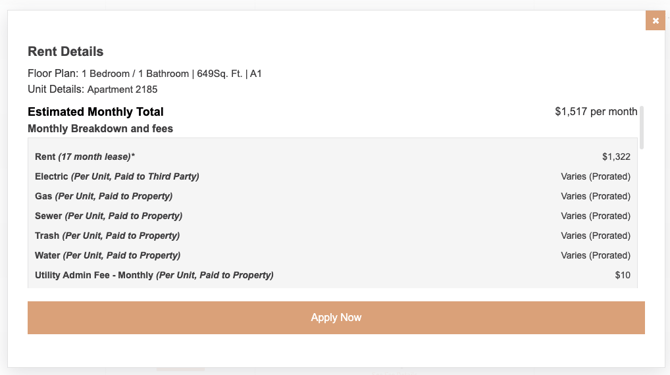
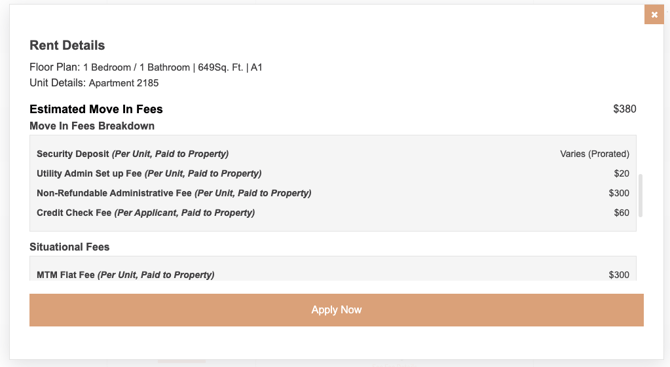
Option 2: We are also able to embed the Yardi Cost Calculator iframe directly into our Unit Level view similar to what is shown going through the RentCafe application portal.
Example: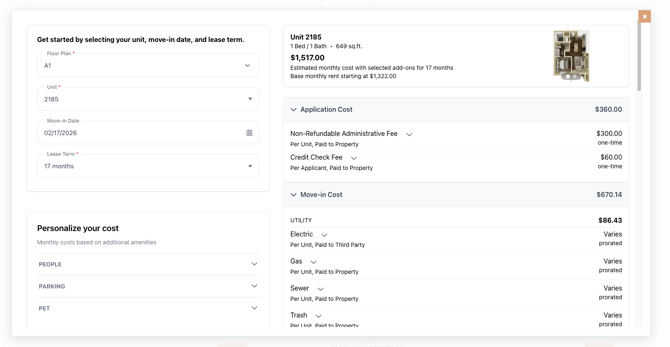
Need Help?
If you have any questions or would like help completing these steps, your Repli Customer Success Manager is happy to assist.