
How to generate a token.
-
Log into MultiHub
-
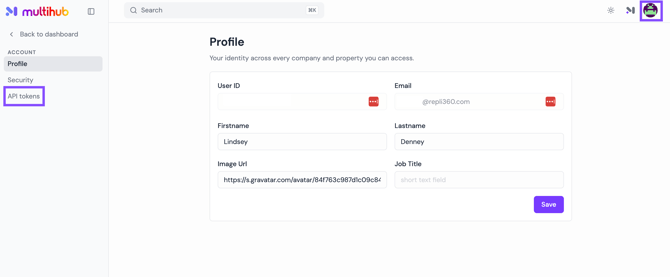
Go to your Profile in the top right
-
Click API Tokens in the left-hand menu
-
Name the token, then select Generate token
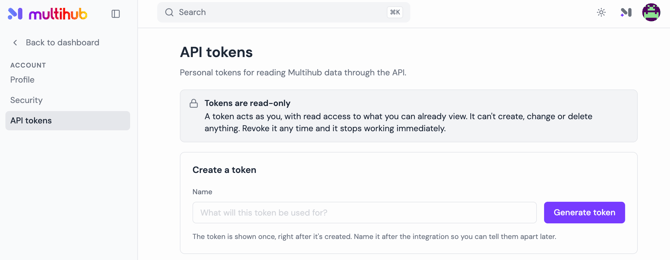
Each token is user-specific — it is tied to your individual MultiHub login, not your organization, so each team member who needs API access should generate their own.
How to delete a token.
- In your MultiHub Profile > API tokens, find the token you want to remove under Your tokens
- Click revoke to remove the token
- Once a token is revoked it's marked inactive and disappears from your list, and it can't be used again.
- Revocation may not take effect immediately. The system caches valid tokens for up to 15 minutes, so a revoked token can keep working for up to 15 minutes on a server that has already seen it.
Managing tokens.
- Exposed tokens: If you think a token has leaked, revoke it there and create a new one. The old one stops working once the cache expires.
- Tokens made by connecting Claude (MCP): These are named "<client> (MCP)" in the same list. Revoking one ends that connection.